Summary of our CanLII Webinar

If you have missed the last training session on CanLII or just want to have another look, here is a summary of what was said.

About CanLII 

CanLII stands for Canadian Legal Information Institute. It is a non-profit organization that started in 2001.  

  • It was funded in a joint effort by the Federation of Law Societies. 
  • In general, it is part of a larger free access to the law movement. This website is available to anyone with internet access, with no cost to the user at any point. 
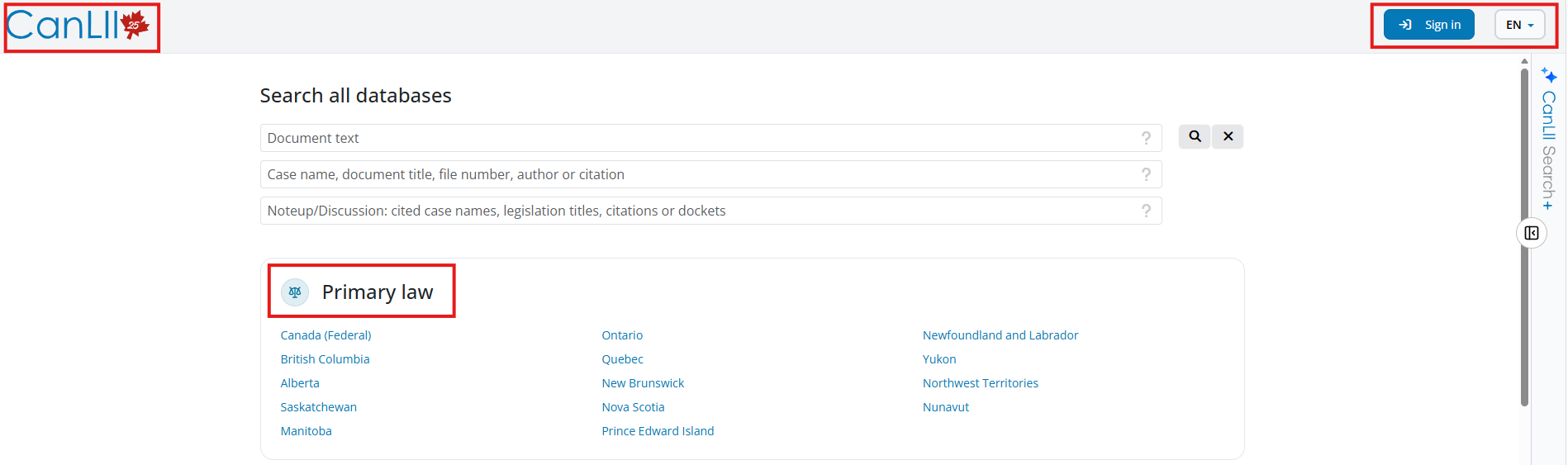
In the top right corner, there is a drop-down box if you wish to change the language of the website, their interface is bilingual, but it will not change the language of the case or the legislation you are looking at. To do that you will have to change the language from the document you are viewing. It is a separate function because not all content is available in both languages. You also have the sign in button. You do not need an account to use CanLII. It is only if you wish to use their other functionalities, such as myCanLII and the CanLII AI tool. On the other side, the CanLII logo will bring you back to the homepage when you click on it.  


Primary law 

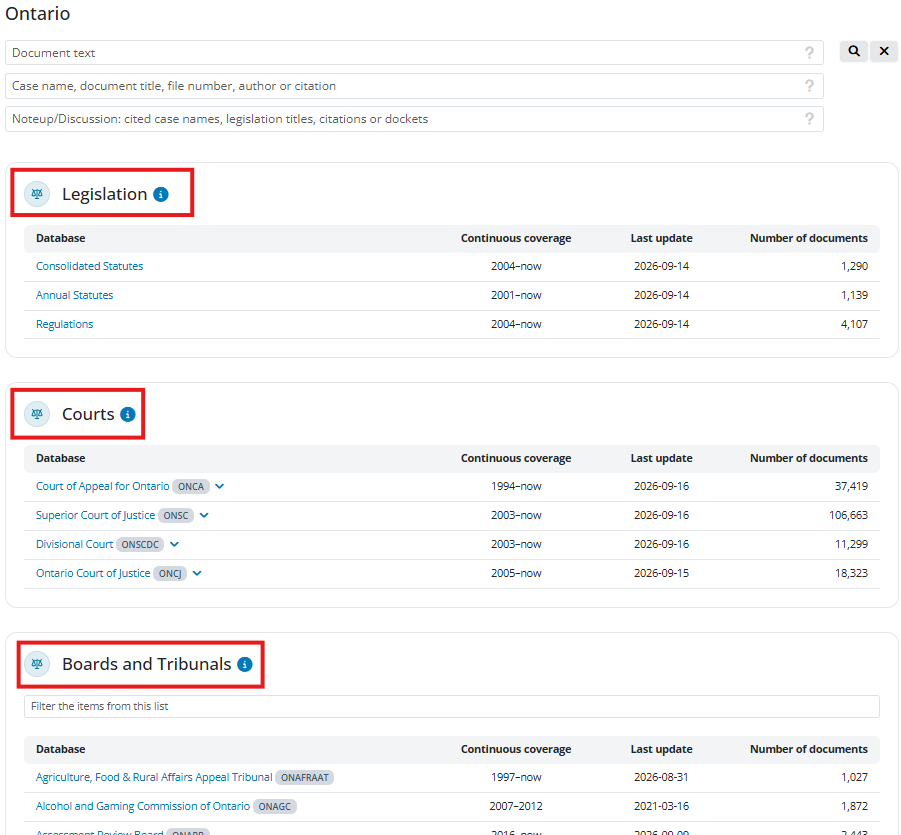
Under the search section, we have Primary law.  This section contains legislation and decisions from all over Canada. Here is the page for Ontario:
Ontario Primary Law

You can then use the search box at the top, and it will search things from Ontario only or you can browse through the list of databases. From here, you have access to legislation, Courts and Boards and Tribunals decisions from Ontario. The Federal page looks very similar.


Commentary 

Commentary refers to the secondary resources that CanLII has, meaning materials about the primary materials. That collection contains a few different types of commentary materials, so to get to the commentary, you can click on See all and then you can choose which type of document you want to browse, books, articles, reports, etc. It will then show you a list of the different publications or where the material is from. 

CanLII commentary section

I want to highlight three items under books. They can all be found under CanLII (Canadian Legal Information Institute). 


Searching

You have three options to begin your research. If you use the boxes from the main page, you are by default searching everything on CanLII – all federal and provincial legislation, cases, decisions, commentary, etc.

CanLII Search boxes

Document text 

The first one, “Document text”, is your keyword search. It is in this box that you will use your Boolean terms and keywords.  

For example, you can use this box when you do not know exactly the case you are looking for, you have larger question or you are looking for something on a specific topic. This box will not predict what you are typing. 
CanLII Search

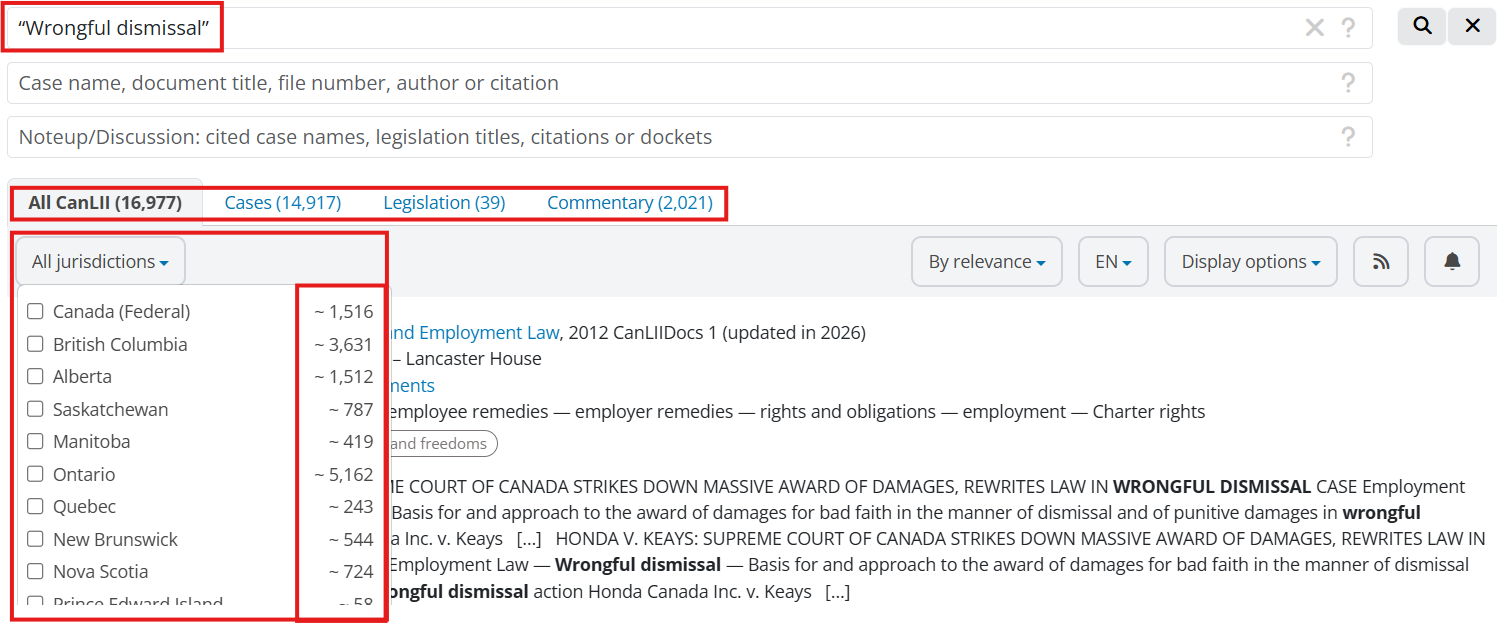
The first tab says “All CanLII”. As you look along the rows, you can see where those are (cases, legislation and commentary). 

That first tab for all of CanLII – you can do an immediate sort right here by jurisdiction. Next to each jurisdiction is a number – that is how many results per jurisdiction.  

If you are doing this search to find case law, you want to move over to the next tab, which is the cases tabThere are four options, which you can see just below the tab – jurisdictions, court and tribunals, date, and subjects. 

For the first, jurisdiction. It is the same as the one we just saw. When you select a province, you will get the line at the top. It says “there are X decisions from the Supreme Court of Canada that match the search” – add them to your results. This means the results in general are just from the province you selected, which is what you want, but you might be missing some key upper court decisions. It will only ask for the Supreme Court, as it is the highest court. 

If you want to do some custom court level searching, this is where you use the next set of filters, All Courts and Tribunals. You will be able to select precisely which courts you want to see results from. The default is all courts and all tribunals. 

Next filter is date. The default, of course, is any date. You can make this more specific – with the preset options, last week, last three months, last year, last three years, last ten years, and then you can get into some specific date is and date range. 

The last filter is Subjects. These classifications are available as a filter, and are also displayed in the search results list (as bubbles). Note though that these are for court decisions only, not tribunals. 

Now if you were looking for legislation in your results, you would use the next tab over – legislation. First up, there is a similar jurisdiction filter, which will let you select the province, territory, or federal. 

CanLII legis

The second filter is the type of legislation, it will let you pick constitutional acts, statutes or regulations. You may see some options here that are not available for the jurisdiction you are working in. For example, historical revised statutes are not available for Ontario.  

The final filter is a version or date filter. CanLII does offer point-in-time versions of legislation – early 2000s is about as far back as you can go. You can enter a date there and they will bring you to the legislation available on that date. 

Under the last tab, commentary, you will see there are four ways to narrow. The first is subjectsThe second is type. The third is publication year. 

CanLII comms

The fourth is sources. This gives you three options for some of the commentary on CanLII – titles from the CanLII authors program, the CanLII connects blogs, and “other sources” which are the non-CanLII authors in the commentary collection. Again, you can combine the filters, but you might find your results dropping rapidly. You can always modify your search from the same page, using the search boxes at the top.

A couple other things to note about the results screen. First off, where it says “By Relevance.” If you click on the down arrow, you can change the order in which your results are appearing. 

Next, you have the language option. If you want only French results, you can change it and it will show you only the documents available in French. You can note that it is less than in English, because not all of them have a translation. 

You then have the display options. There are two main options, the list and the list with a view of the document.


Case name, document title, file number, author or citation 

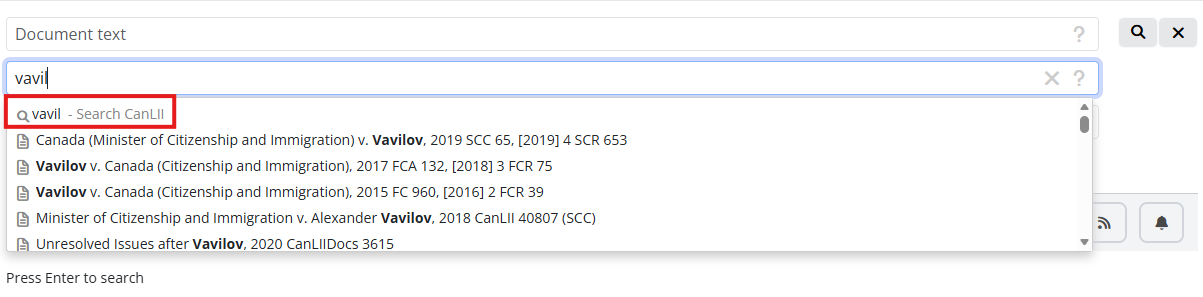
The second box is to find a specific document. For example, if you are looking for Canada v. Vavilov, you start writing and it will give you a list of related documents that you can scroll. You can then click on the document you were looking for, and it will bring you directly to it. CanLII uses a predictive text to suggest results.  

If you do not see it in the list, you can start typing and press enter or select the first line. It will then give you a normal list of results.  

You can also use that section to find other types of documents, such as legislation. And you will be taken directly to that piece of legislation, the most current version of the title you selected.  
CanLII documents

Noteup/Discussion 

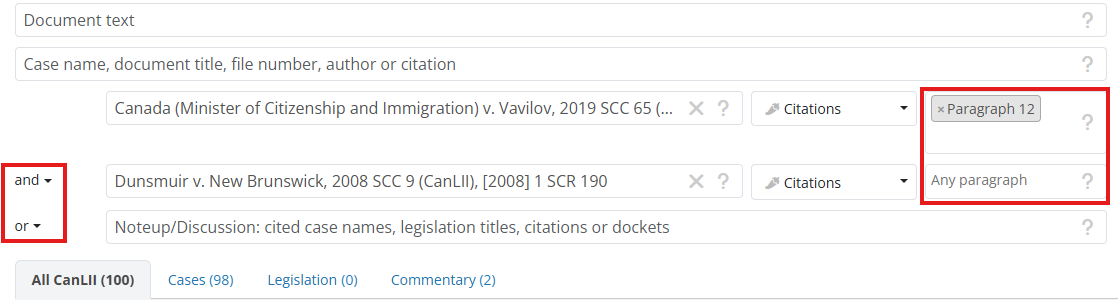
The last box is the Noteup/Discussion box. It will allow you to see the documents that cite a specific case, piece of legislation or other type of document. You can also add specific paragraphs to your search. Same thing if you are looking into a certain Act, you can add one or more sections. That way, you can do a very custom search.  

One thing to point out is the “Or” section to the left. It lets you set up a search that searches for something citing Document A or Document B. You can change that to “And”. You can add more documents than that, but this is a great feature if you are trying to narrow down a lot of citing cases to something on a very specific point.  
CanLII Noteup

Documents

CanLii doc

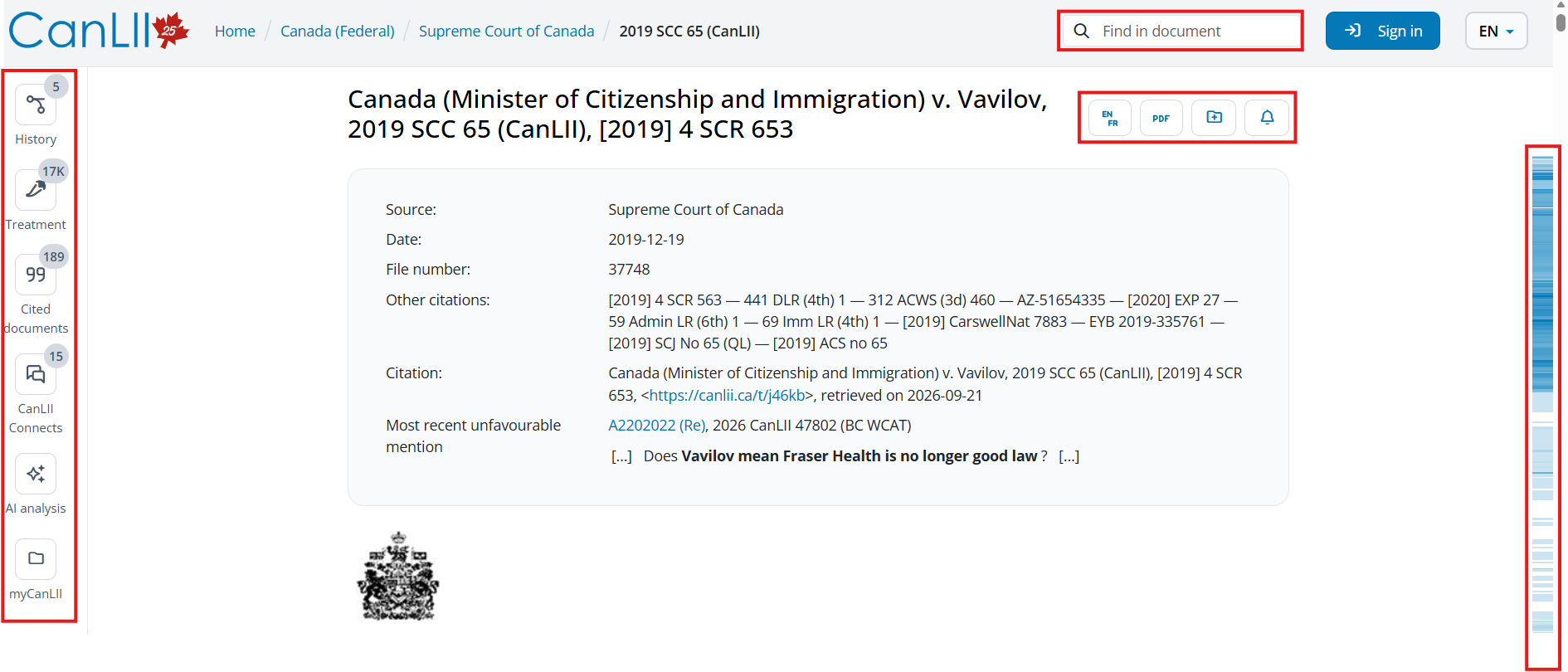
Once you have selected a document, right at the very top here, we have the “Find in document” search bar. Here, you can enter a word or use quotation marks to look for a phrase, hit enter, and this word will be highlighted where it appears on the page. There are also arrows that can help you skip through the document to those appearances and you can also edit your search. 

Next thing is the link to toggle between languages. Because this case came from the Supreme Court, it is available in both English and French, so CanLII has both. If you click on it, it will switch to French, but your interface will still be in English. 

You also have at the top a PDF link. If you want to download the document or print it.  

Immediately underneath is the rest of the case information – date, alternate citations, and then the citation you could reference for finding this on CanLII, you also have a short permanent URL, I encourage you to use this one if you link the decision in a document or in an email. You will be sure that the link will be working long term. Beneath that: Most recent unfavorable mention

Next is the left sidebar. Clicking on any of those options will open up the information contained within the tab in the same screen as the document you are looking at. First up is History. It lists decisions related to this case. Sometimes a decision is missing or unavailable.

After that is Treatment. The documents that cite this decision specifically. Within this tab, there are three sub sections. The first subsection is everything that cites this decision, including commentary. This is a list of the most recent. The second tab is discussions, documents that discuss the document you are viewing. The jalapeno peppers are to indicate intensity. The highest ranking is five peppers. Blue peppers are discussion and yellow are unfavorable mentions. The third tab is just for the yellow peppers, so unfavorable mentions. You will not get a full list from these tabs; only 10 documents. To see all these documents, click on the Search for all discussing documents at the bottom. This will bring all the search results from the previous screen. You can now add keywords to your search or choose a paragraph. There is no further analysis applied to these results than the peppers. You can also filter results in the same way than showed before.  

Next, we have the Cited Documents. These are cases or legislation that are cited within this decision. If it is in blue, you can click on the hyperlinked words, and that will open that document in full. You can also see where it is cited within the decision. Clicking on the eye icon will prompt CanLII to highlight the instances of this piece of legislation within your document, and you can use the arrows in the top right corner to scroll through the decision.  

Next is CanLII connect. This will take you out of CanLII and to CanLII Connects, which is a site with related commentary or case summaries from the legal community.

Next is the AI Analysis. You like the name it is an analysis of the case provided by an AI tool. It includes the facts, history, legal issues, reasons and more. 

Last one is myCanLII, so if you have an account you can add the decision to your research folder or create an alert. 

We have looked at noting up the decision before from the tab on the left hand side, but you can also note-up from within the text of the decision. Looking at a document on CanLII you will find these bubbles with a pen on the right side. When you click on it you have different options. Copy text, copy the citation of this paragraph, copy link, change the language, alerts and finally the citing documents. When the bubble has a number, it tells you that this section has been quoted elsewhere. The blue on the side bar also highlights sections that have been quoted. The darker the blue, the more that section has been cited. You can click on the bar to navigate in the decision or if you hover over it, you will have a view of the paragraph.  

If you click on the “Citing Documents” link, you will be sent to the same search-results screen, but this time the results are showing just document that cite to that particular paragraph. 


Legislation 
CanLII legislation

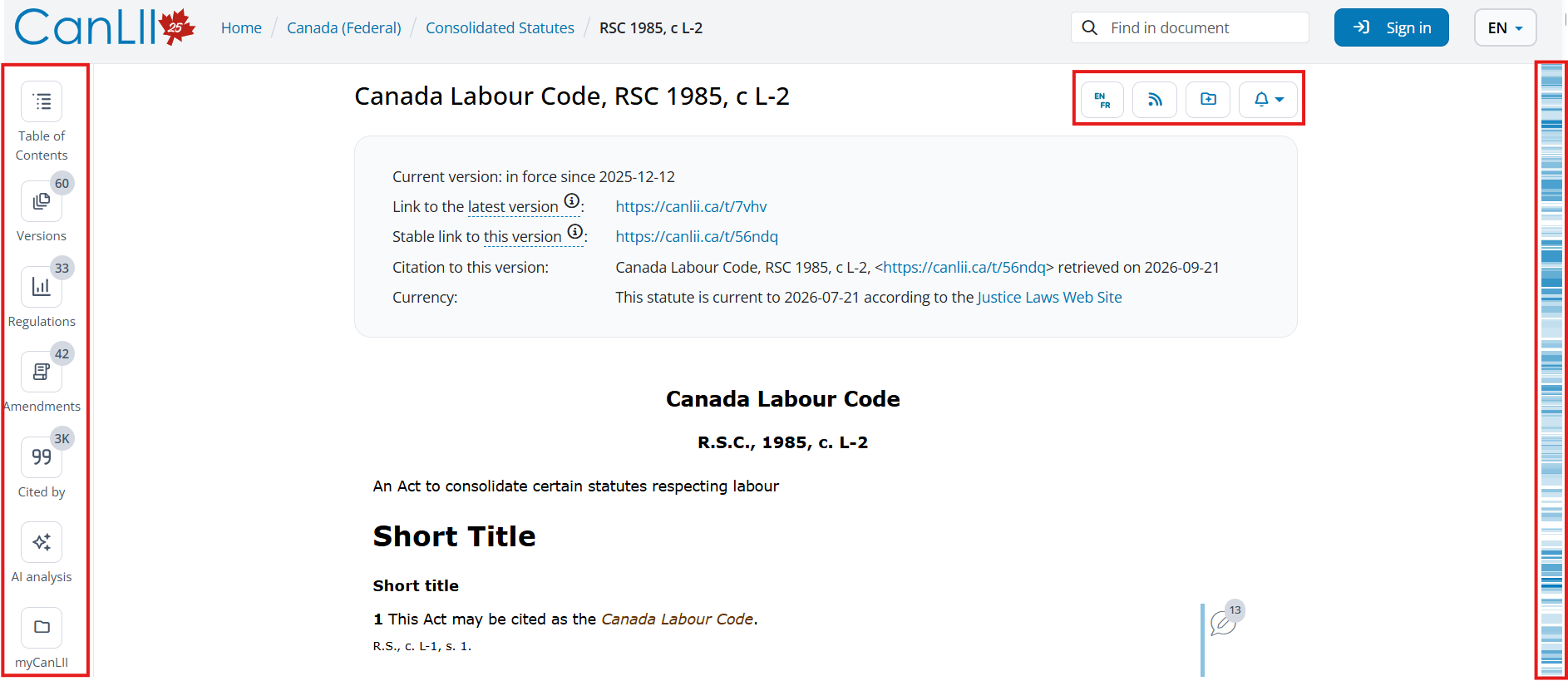
For legislation, it is very similar. You have similar option at the top, like the language. You also have the blue bar on the right, it works the same. Immediately under the name and citation, we have additional information about this document. You have the currency of the legislation prominently displayed. You can also see the last date it was updated and from where just below that. There is also a permanent link.  

Moving over to the left-hand side, we have a series of tabs. The first here is the table of contents. When you click on this, we will again get a sidebar that pops out, that you can adjust, that has the table of contents for this document. Up at the top of this tab, you can also see a search box. It will search the content for what you put in there. 

Next is the versions tab. The default when you pull up this legislation from a basic search is the current version. You can click here on those blue hyperlinked date ranges to pull up the version of the legislation that was in effect in that specific date range. This will change what you are seeing on the right-hand side. You will note there is a warning at the top in red to indicate this is not the current version.  

If you want to compare two versions of the act, you need to select which versions you want to see the difference between. CanLII will go through and highlight differences. You can scroll through those differences using the arrow buttons at the top. You can also select other versions to compare from this page using the drop-down menu at the top.  

Next, is the Regulations tab. In force regulations are at the top, repealed, spent, or not in force are at the bottom. There is a filter bar, so you can enter a term here, but it is only looking for that term in the title of the regulation. 

Next tab is Amendments. This tracks amendments back to 2001 federally and in Ontario, but the coverage may be different for other jurisdictions. If you click on it, it will take you to the amending statute, the source law.  When you click on a document from this list, the tab that says “Amendments” in other legislation now says “amending” and list the legislation this amends.  

Finally, the last tab is Cited By. This is one of the ways that you can note up legislation. Just like with decisions, you will only get 10 results here. Click on Search for all citing documents to bring back all the citing documents for this legislation. The third box has the legislation we are looking at, and when you first click over here, it will be for any citation, any section. Again, you can add a section or more, and keywords. 

Another way to note up a section is to do that directly from the section you are interested in. You will see on the right hand side that there is a similar quotation bubble. You can click on that and get those same tools, but also a link to citing documents.  


CanLII Search+ 

CanLII Search+ is their new AI functionality. To use it, you will need to create an account, which is free.  

It does not work like most AI tools available on legal databases. It will not give you a direct answer or create new content for you, but will instead act as a research assistant, helping you create your search queries and analyze the results. It is not an AI tool that is going to hallucinate; it just maybe will not always give you the best results. It is great if you are not familiar with Boolean terms or if you are having difficulties formulating your queries. It can also be a faster way to find the decision you are looking for.  
CanLII Search+

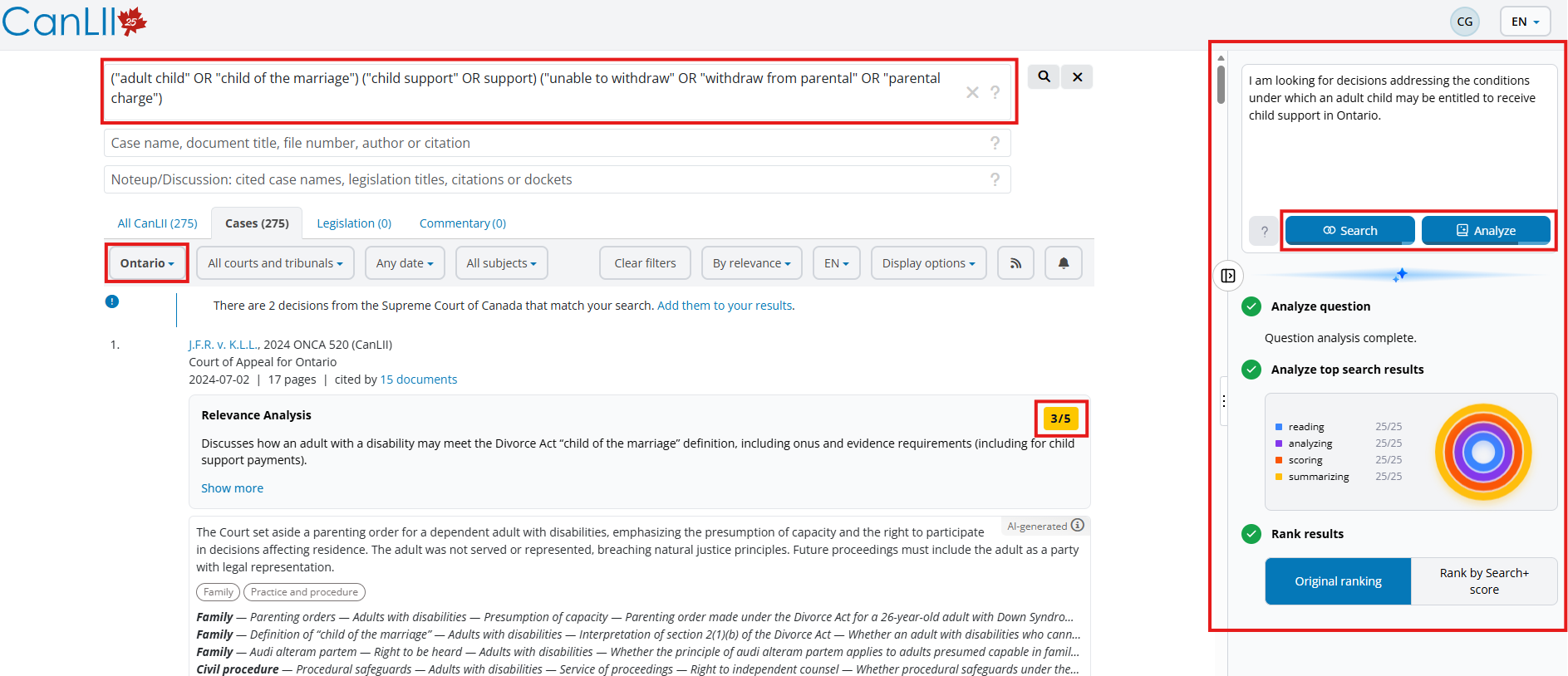
Once you are logged into your account, you will find the tool on the right side of your screen. You just need to write your question in the first box and click on Search

You will find the query in the first search box of the top of the page, and sometimes it will use the filters. You can then browse the results yourself or you can click on Analyze, and the tool will rate the results out of five. After it is done analyzing, you will see the scores on the right. You might want to check the higher scored decisions first.   

The tool is free, but you have a limited amount of research and analysis per day (10 searches and 100 documents analyzed). 

Even though this tool does not think for you, you need to be careful when using it like any other AI product. Double check the results and do your own research. You can also use the query it gives you on other databases or modify it. Try different words or Boolean operators.  

That is it for the CanLII training, do not forget to check and register to our upcoming training sessions – Library Events


Lexis+ Now Available at the CCLA Library!

We’re excited to announce that Lexis+ is now available at the CCLA Library! We’re very happy to welcome the new and updated user interface, as well as the added Legislative Pulse and Brief Analysis capabilities. You can access Lexis+ onsite at the courthouse through our CCLA Library Toolkit, either through the computer terminals in the library or on your own device as long as you are connect to our CCLA Courthouse Wifi.

Please see the publisher’s note below for more information and for some upcoming training sessions!


Lexis+ Canada is a comprehensive integrated legal research and workflow tool providing a range of features designed to enhance legal research and practice:

  • Access the vast collection of case law, editorial analysis, and data visualization with over 490 full-text textbooks and looseleaf publications in more than 30 different areas of law.
  • Rely on the up-to date practical material within Practical Guidance to support your day-to-day practice.
  • Track upcoming legislative changes with the Legislative Pulse service.
  • Extract any relevant information from Lexis+ Canada to make sure you cover everything mentioned in your document with Brief Analysis.

Training Sessions for Courthouse Library Staff and Lawyers – CPD Accredited for Professionalism  (1 hour in length)

The session will be offered at four dates and times as listed below along with the link. Click to attend each session via Zoom, no registration needed in advance.

Training Resources

Thank you to LiRN for making this addition possible through the e-LiRN suite of electronic resources.

Library Information for Summer Students

Welcome new Ottawa summer students! If you’re a law student working a firm this summer, we’d like to invite you to a tour of the CCLA Library and learn more about our services. Library tours are a great opportunity to meet library staff and learn about the legal research services and resources we can offer, training opportunities, and legal services to support and assist a legal practice. We also encourage any and all students to sign up for the CCLA Newsletter to begin learning about news, events, and opportunities in the East Region. The newsletter is always free, and not tied to CCLA membership.

Tours will be held beginning May 11 on Wednesdays at 10:30 AM, and usually take between 15 to 20 minutes. Please email library@ccla-abcc.ca or call 613-233-7386 x221 to schedule a tour. Need another time? Would rather meet virtually? We can do that, too! Email the library and let us know how we can help you get started this summer.

HeadStart Ottawa 2020: Legal Research for Articling & LPP Students

Welcome to all new articling and LPP students!

The CCLA Library is excited to announce a virtual series legal research programs for our incoming students this fall. (If you’re coordinating your students at your firm or organization, please take note!) You can register for all or just some of these programs, but we strongly suggest attending our first session on September 24.

All of our library research sessions are completely free, and will also be recorded so they’re available later. Click on the program title to register, or send us an email if you’re registering multiple students.

HeadStart Ottawa: Legal Research for Articling & LPP Students 
Thursday, September 24 @ 2:00 – 3:00 PM
This is our flagship student session, and we are so excited to see you there – over Zoom! Join us virtually this year to get right down to the most critical pieces of information you need to know for doing research over the next year (and beyond). You are guaranteed to leave the session with a clear idea of how you’ll approach your research assignments, and which research platforms, materials, and supports are in place to help you succeed.

Lexis Advance Quicklaw 
Monday, September 28 @ 2:00 – 3:00 PM
This session is fantastic for anyone who is working with Quicklaw in their offices, or who prefer to use this platform at the CCLA Library. It’s also great if you’re generally unfamiliar with what is included in a Quicklaw subscription (spoiler: A LOT). For this session, we’ll turn it over to local Quicklaw trainer Ron Jones, who will show you the ins and outs of this platform and how you can make the most out of your time on Quicklaw.

WestlawNext Canada 
Tuesday, October 6 @ 2:00 – 3:00 PM
If you’re planning on using WestlawNext Canada in your research, whether at your office or at the CCLA, this session is definitely one to attend. Our local WestlawNext trainer Josee Provost will show you how to best use this platform in your research, including the various practice-area specific sources that the CCLA subscribes to.

CanLII 
Thursday, October 15 @ 2:00 – 3:00 PM
CanLII is wildly popular with everyone working in the justice system. If you haven’t had much cause to use it before but will be relying on it more frequently as you enter a legal practice, this session is a great overview of CanLII’s functionalities. There will certainly be some neat tips and tools that you didn’t know about!

Legislative Research 
Tuesday, October 27 @ 2:00 – 3:00 PM
Lawyers love to assign legislative research tasks to their students! If that thought scares you, be sure to sign up for this session. CCLA’s Reference Librarian and legislative research aficionado Brenda Lauritzen will take you through some of the most common types of legislative research tasks and leave you feeling ready to take on an assignment.

Library Tours 

Group tours of the Gordon F. Henderson Library will not be available this fall due to space constraints, but we are happy to provide individual tours. Please email us if you’d like a tour of the space.

Information for 2020-2021 Summer and Articling Students

Even though we may be living in extraordinary times, particularly for the justice sector, the staff of the CCLA Library are still here for you. This is especially true for this year’s summer and articling students. Normally, we invite students to come to the CCLA to meet us, have a tour of our space, and learn about our library services. As we don’t have a projected re-opening date, we aren’t able to invite students over, but we still very much want to meet them. Working with students is one of our favourite and most important jobs, so if you don’t read any further in this blog post, please pass along our email (library@ccla-abcc.ca) to your students!

If you will be taking on students (or already have), for either a summer term or for an articling year, please let us know! Student memberships in the CCLA are available – find out more and register here. However, if you aren’t sure that you’ll be signing your students up for membership, we’d still be grateful if you could send us a quick note with the names and emails of your students so that we can reach out to them and let them know about the CCLA Library.

As always, please encourage your students to sign up for our free email newsletter at this link. The CCLA News weekly newsletter and special announcements are a vital form of connection for the Ottawa legal community, and we’d love to have them on our list.

HeadStart Ottawa: Legal Research for Articling and LPP Students

In previous years, we’ve held a session exclusively for articling and LPP students called “HeadStart Ottawa.” While we may not have access to our physical space this year, we are delighted to announce that we will be planning a virtual HeadStart program for later this summer. Details on this free session will be available soon, so keep an eye out for that!


Upcoming Legal Research Webinars

As both Thomson Reuters (the publisher of WestlawNext Canada and ProView) and Lexis Nexis (of Lexis Advance Quicklaw) have both extended offers to Ontario legal practitioners for at-home access during the COVID-19 emergency, we at the CCLA have set up some online training on all of these products for you to brush up on your skills!

Lexis Advance Quicklaw Webinar – Tuesday, May 12, 2020

Brush up on your research skills! Join us on Tuesday, May 12, 2020 at noon for an hour-long virtual training session on Lexis Advance Quicklaw. If you use this database but could use some fresh instruction on how to use it more effectively, this is the session for you.

This program has been LSO accredited for 1.0 CPD hour toward the annual Professionalism Requirement.

There is no cost for this program. Please click here for more information and to register!


WestlawNext Canada Webinar – Tuesday, May 19, 2020 & Thomson Reuters ProView Webinar – Tuesday, May 25, 2020

Brush up on your research skills! Join us online for our free upcoming training on WestlawNext and ProView (e-books and e-looseleafs). Please register at the links below:

These programs has been LSO accredited for 1.0 CPD hour each toward the annual Professionalism Requirement.


Personalized Virtual Training Sessions for WestlawNext and ProView – Anytime!

These times don’t work for you? Want something a little different? We’re also pleased to share that you can now schedule your own personalized virtual training session on WestlawNext or ProView with our wonderful trainer, Josée Provost. To schedule a session, please click here!


Upcoming Training @ the CCLA

If you’re looking to get a jump on your 2020 CPD hours *and* brush up on some legal research skills at the same time, look no further! Here are upcoming legal research training sessions we’ll be putting on.

WestlawNext Canada – Thursday, January 30, 2020 @ 12:00 (In-Person) 

WestlawNext Canada training is back! Join us on Thursday, January 30 as we welcome trainer Josée Provost for an hour-long session on WestlawNext Canada. If you use this database but could use some fresh instruction on how to use it more effectively, this is the session for you.

This program has been LSO accredited for 1.0 CPD hour toward the annual Professionalism Requirement.

WestlawNext Canada contains a wealth of Canadian primary law, renowned commentary and value-added tools. In this session, we will cover how to:

  • Browse the CED, Canadian Abridgment and other exclusive WLNC content
  • Find specific documents by Citation or Name/Number
  • Link to Citing References and Other Related Documents (Noting up)
  • Perform searches using Plain Language or Boolean Connectors
  • Organize and filter Search Results
  • Work with Documents (Print, Email, Download)
  • Access Your Research History


Jurisource – Juedi, le 13 février 2020 @ 12h (En personne)

Jurisource.ca est une bibliothèque virtuelle qui recense des milliers de ressources tels que : des modèles d’actes, des listes de contrôle, des lexiques, des ressources linguistiques, des infographies, etc.

Me Alexanne Stewart, agente de projet chez Jurisource.ca, vous aidera à vous familiariser avec cet outil très utile pour la recherche juridique et terminologique.

Veuillez noter que la session est gratuite et peut compter à titre d’une heure de droit de fond pour la formation professionnelle continue (FPC) du Barreau de l’Ontario.


Hein Online – Wednesday, February 26, 2020 @12:00 (Webinar)

Did you know that LSO lawyers have free access to HeinOnline, a legal research database that you can use from your office or home? Join us for a lunchtime webinar to learn about the wealth of legal materials available to you and how to access it quickly and efficiently. We will also cover to browse and download journal articles and historical legislation, and how to save time by optimizing your searches.

To cover costs of the webinar, this session is 10$; you can register here. The day before the session, we’ll send you an email with the link you need to get into the webinar. You’ll need either speakers or earphones for your computer.

This session is eligible for 1 substantive CPD hour.


Lexis Advance Quicklaw – Tuesday, March 24, 2020 @ 12:00 (In-Person)

Join us on Tuesday, March 24 a for an hour-long training session on Lexis Advance Quicklaw! If you use this database but could use some fresh instruction on how to use it more effectively, this is the session for you.

This program has been LSO accredited for 1.0 CPD hour toward the annual Professionalism Requirement.

In this session:

  • Learn to search the broadest collection of Canadian primary and secondary sources using a refreshingly new design that features a streamlined single intuitive search box allowing you to search as you like. As well, you will learn how selecting favourite sources or pre-search filters can help narrow your starting point.
  • Access extensive content coverage including Canadian Case Law; Case Summaries; Citators; Administrative Decisions; Acts; Regulations; Court Rules; Constitutions; Forms and Precedents; and Textbooks including Halsbury’s Laws of Canada.
  • Discover how to search by name, by source or topic, citation or keyword; navigate and refine search results; deliver documents; note up cases and statutes using the QuickCITE® Case Citator and the QuickCITE® Legislation Citator.
  • Discover how the ‘History Content Pod’ can help you streamline your workflow by viewing your search history, search terms, most recently opened documents, or, by viewing a graphical map of your search activities allowing you to jump right back into any part of your research.
  • See how highlighting and annotating can help you keep track of important and relevant material by saving them to customizable and sharable folders.


CanLII – Thursday, April 16, 2020 @ 12:00 (Webinar)

On April 16th, join us for a lunchtime training webinar on CanLII, the legal research tool that you can use for free from your home or office!

To cover costs of the webinar, this session is 10$; you can register here. The day before the session, we’ll send you an email with the link you need to get into the webinar. You’ll need either speakers or earphones for your computer.

This session is eligible for 1 substantive CPD hour.

Upcoming Library Training

Now that our newly-renovated CCLA lounge is open, we’re pleased to announce our Library Training dates for the fall! All of these sessions will take place in our new boardroom, Suite 2004 at the 161 Elgin St courthouse. You will need a courthouse security pass to enter through the lounge doors, or if you do not have a security pass you can come to the library front desk and we can direct you to the space.

Mark your calendars and RSVP at the links below! These sessions are free to attend.

WestlawNext Canada

Monday, September 23, 2019, 12:00 – 1:00 PM; CCLA Nepean Boardroom (161 Elgin St, Suite 2004)

WestlawNext Canada contains a wealth of Canadian primary law, renowned commentary and value-added tools. In this session, we will cover how to:

  • Browse the CED, Canadian Abridgment and other exclusive WLNC content
  • Find specific documents by Citation or Name/Number
  • Link to Citing References and Other Related Documents (Noting up)
  • Perform searches using Plain Language or Boolean Connectors
  • Organize and filter Search Results
  • Work with Documents (Print, Email, Download)
  • Access Your Research History

This program has been LSO accredited for 1.0 CPD hour toward the annual Professionalism Requirement.


Thomson Reuters ProView

Wednesday, October 9, 2019, 12:00 – 1:00 PM; CCLA Nepean Boardroom (161 Elgin St, Suite 2004)

Many legal secondary sources are now being purchased by firms and courthouse libraries in an electronic format. One of the most popular e-book readers for legal texts is Thomson Retuers ProView. Join us as we welcome trainer Josée Provost for an hour-long session on using this new platform, which holds many of our most popular titles in the library.

ProView is the next generation platform that allows you to view your CCLA looseleaf subscriptions in an online format. In this session, we will discuss:

  • Working with the Table of Contents
  • Performing Keyword Searches
  • Creating PDFs for sharing and printing
  • Locating the latest updates
  • Accessing other ProView titles

This program has been LSO accredited for 1.0 CPD hour toward the annual Professionalism Requirement.


Lexis Advance Quicklaw

Wednesday, October 30, 2019, 12:00 – 1:00 PM; CCLA Nepean Boardroom (161 Elgin St, Suite 2004)

Join us on Wednesday, October 30 a for an hour-long training session on Lexis Advance Quicklaw! If you use this database but could use some fresh instruction on how to use it more effectively, this is the session for you.

In this session:

  • Learn to search the broadest collection of Canadian primary and secondary sources using a refreshingly new design that features a streamlined single intuitive search box allowing you to search as you like. As well, you will learn how selecting favourite sources or pre-search filters can help narrow your starting point.
  • Access extensive content coverage including Canadian Case Law; Case Summaries; Citators; Administrative Decisions; Acts; Regulations; Court Rules; Constitutions; Forms and Precedents; and Textbooks including Halsbury’s Laws of Canada.
  • Discover how to search by name, by source or topic, citation or keyword; navigate and refine search results; deliver documents; note up cases and statutes using the QuickCITE® Case Citator and the QuickCITE® Legislation Citator.
  • Discover how the ‘History Content Pod’ can help you streamline your workflow by viewing your search history, search terms, most recently opened documents, or, by viewing a graphical map of your search activities allowing you to jump right back into any part of your research.
  • See how highlighting and annotating can help you keep track of important and relevant material by saving them to customizable and sharable folders.

This program has been LSO accredited for 1.0 CPD hour toward the annual Professionalism Requirement.


CanLII

Wednesday, November 27, 2019, 12:00 – 1:00 PM; CCLA Nepean Boardroom (161 Elgin St, Suite 2004)

Your legal research doesn’t have to be time-consuming and expensive. Learn to effectively use one of Canada’s best free resources – CanLII.org. Conduct case law searches, browse recent court and tribunal decisions, find and note up bilingual point-in-time legislation, setup alerts for new cases, and much more!


CCLA Articling & LPP Students Breakfast & Legal Research Primer

On August 22, the CCLA welcomes 2019-2020 articling and LPP students to our breakfast and legal research primer!

Following a light breakfast, students will take a crash course in the legal research they’ll be given over the next year, and how to get the work done. They will also have a chance to tour the CCLA library and learn about all of the resources we have available for to use at absolutely no cost.

This event is free with payment of the CCLA articling student membership registration. For $25 + HST, CCLA Articling Student Membership entitles students to 24/7 access to the CCLA Library, an Ottawa Courthouse Security Card (to bypass security in our courthouse), and other CCLA membership perks.

Registration is capped at 60 students, so make sure to register early!  A waiting list will be established once we hit capacity.

To register (or to register on behalf of your students), please follow this link! If you are already a CCLA student member, please sign in to the site before proceeding and the registration will be free.

Library Tours for Summer Students

With summer students starting in the firms, we’d like to remind everyone that we offer library tours! This year we’re very excited to be able to offer them tours in the newly renovated library! Library tours are a great opportunity to meet library staff and learn about library resources, training opportunities, and legal services to support and assist a legal practice. We also encourage any and all students to sign up for the CCLA Newsletter to begin learning about news, events, and opportunities in the East Region. The newsletter is always free, and not tied to CCLA membership.

Tours will be held beginning May 14 on Tuesdays and Thursdays at 10:30 AM, and usually take between 15 to 20 minutes. Please email library@ccla-abcc.ca or call 613-233-7386 x221 to schedule a tour.